Introduction
Overview
PyGPT is an open-source desktop AI assistant for Linux, Windows and macOS. It supports models from OpenAI (GPT-6 Astra, GPT-5.6, GPT-4, etc.), Google Gemini, Anthropic Claude, xAI Grok, Perplexity / Sonar, DeepSeek, plus models available through HuggingFace, LlamaIndex, OpenAI-compatible APIs, and local Ollama installations such as DeepSeek, Qwen, gpt-oss, Gemma, Mistral, Llama, and others.
Beyond chat, PyGPT includes Agents with Chat, Orchestrator and Swarm workflows, Agent Skills, plugins and MCP connectors, RAG, files and attachments, Python/IPython and system tools, web search, vision and camera input, image and video generation, Computer use, realtime voice, speech input/output, memory, automation, and external integrations. Models can use local and remote tools, work with files, call APIs, and control the desktop or browser when enabled.
Dark theme

Light theme
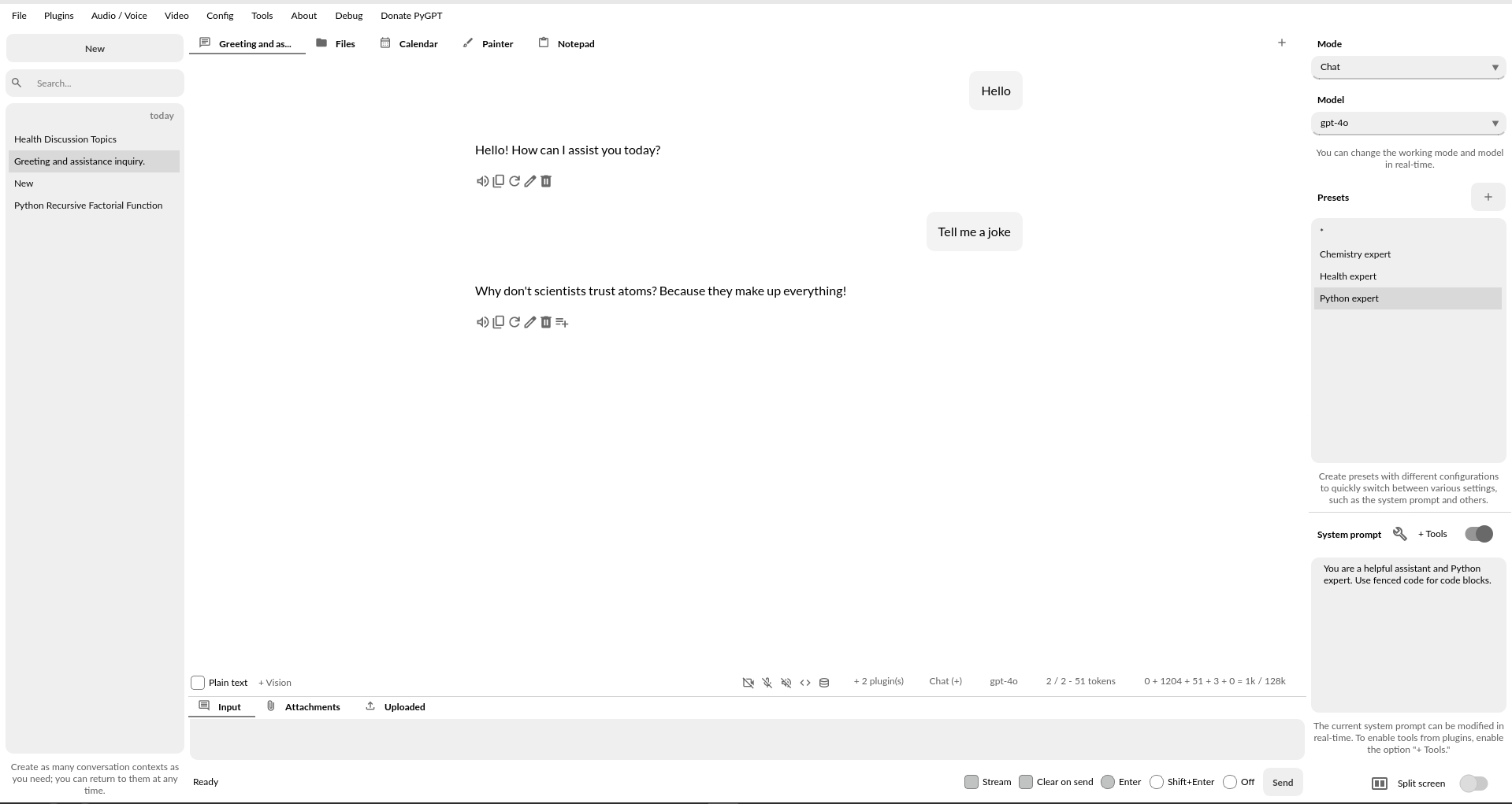
Split-screen

Features
Desktop AI assistant for
Linux,WindowsandmacOS, written in Python.Runs as a local desktop application with a ChatGPT-like conversational interface.
Work modes include Chat, Agents, Realtime + audio, Research, Completion, Image and Video generation, Computer use, Experts, Autonomous mode, and Custom agents.
Supports
OpenAI GPT-6 Astra,GPT-5.6,GPT-4,Google Gemini,Anthropic Claude,xAI Grok,DeepSeek V3/R1,Perplexity / Sonar, and models available throughLlamaIndexandOllama, includingDeepSeek,Qwen,gpt-oss,Gemma,Mistral,Llama, and others.Integrated
LlamaIndexRAG for files, webpages, Google/GitHub data, media, images, conversation history, and formats such astxt,pdf,csv,html,md,docx,json,epub,xlsx, andxml.Built-in vector-store support with automatic file, database-context, and data embedding.
Image generation with models such as
gpt-image,Imagen,Gemini, andNano Banana.Video generation with models such as
Veo3andSora2.Web search via
DuckDuckGo,Google,Microsoft Bingand remote web search.Speech synthesis via
OpenAI,Microsoft Azure,Google Cloud / GenAI,Eleven Labs, andxAI.Speech recognition via
OpenAI Whisper(API or local),Google / Google Cloud / GenAI,Microsoft Bing, andxAI Grok Voice.Extensible plugin system with
Files I/O,Python interpreter,Web search,Google,Facebook,X/Twitter,Slack,Telegram,GitHub,MCP, and more.Model Context Protocol (MCP) support.
Built-in
MCP Connectorsmanager with catalog browsing and import from Claude, Codex, OpenClaw, Cursor, VS Code, OpenCode, MCPorter, and generic JSON/TOML/YAML configurations.Agents multi-agent workflows with Chat, Orchestrator, and Swarm runtimes.
Optional project-specific
.agents/directory support for Agents and Custom agents.Portable
SKILL.md-basedAgent Skillswith GitHub/local import, catalog browsing, per-profile enable/disable, and on-demand loading.Built-in
Python/OStool for real-time Python, IPython, and system command execution.Built-in real-time
Canvaswith annotation support and web browser integration for interactive workflows.Camera capture for real-time image input in Chat and other supported modes.
Image analysis with vision-capable models.
Accessibility features including keyboard shortcuts, voice control, and spoken descriptions of on-screen actions.
Conversation history with short- and long-term memory support.
Integrated calendar, day notes, and conversation search by date.
Tool and command execution through plugins, including filesystem, Python/OS, and system commands.
User-defined custom commands and scripts exposed as tools.
Built-in Crontab / Task scheduler.
File and attachment upload, download, organization, and processing.
Reopen and continue previous conversations, with optional experimental advanced context handling for very long chats.
Editable prompt and model presets for reusable configurations.
Desktop UI designed for direct, practical use.
Built-in notepad.
Built-in painter / drawing tool.
Node-based Custom agent builder for designing Custom agents workflows.
Multi-language interface support.
No prior AI-model experience required.
Extensive configuration options.
Theme support.
Real-time code syntax highlighting.
Built-in token usage estimation and reporting.
Open source; source code is available on
GitHub.Uses the user’s own provider API keys.
and many more.
PyGPT is free and open source. Cloud providers use your own API credentials; local models such as those served through Ollama do not require external API keys. Additional credentials may be required for specific providers and integrations.
Note
This application is not officially associated with OpenAI. The author shall not be held liable for any damages resulting from the use of this application. It is provided “as is,” without any form of warranty. Users are reminded to be mindful of token usage - always verify the number of tokens utilized by the model on the API website and engage with the application responsibly. Activating plugins, such as Web search, may consume additional tokens that are not displayed in the main window. Always monitor your actual token usage on the OpenAI, Google, Anthropic, etc. websites.