Introduction
Overview
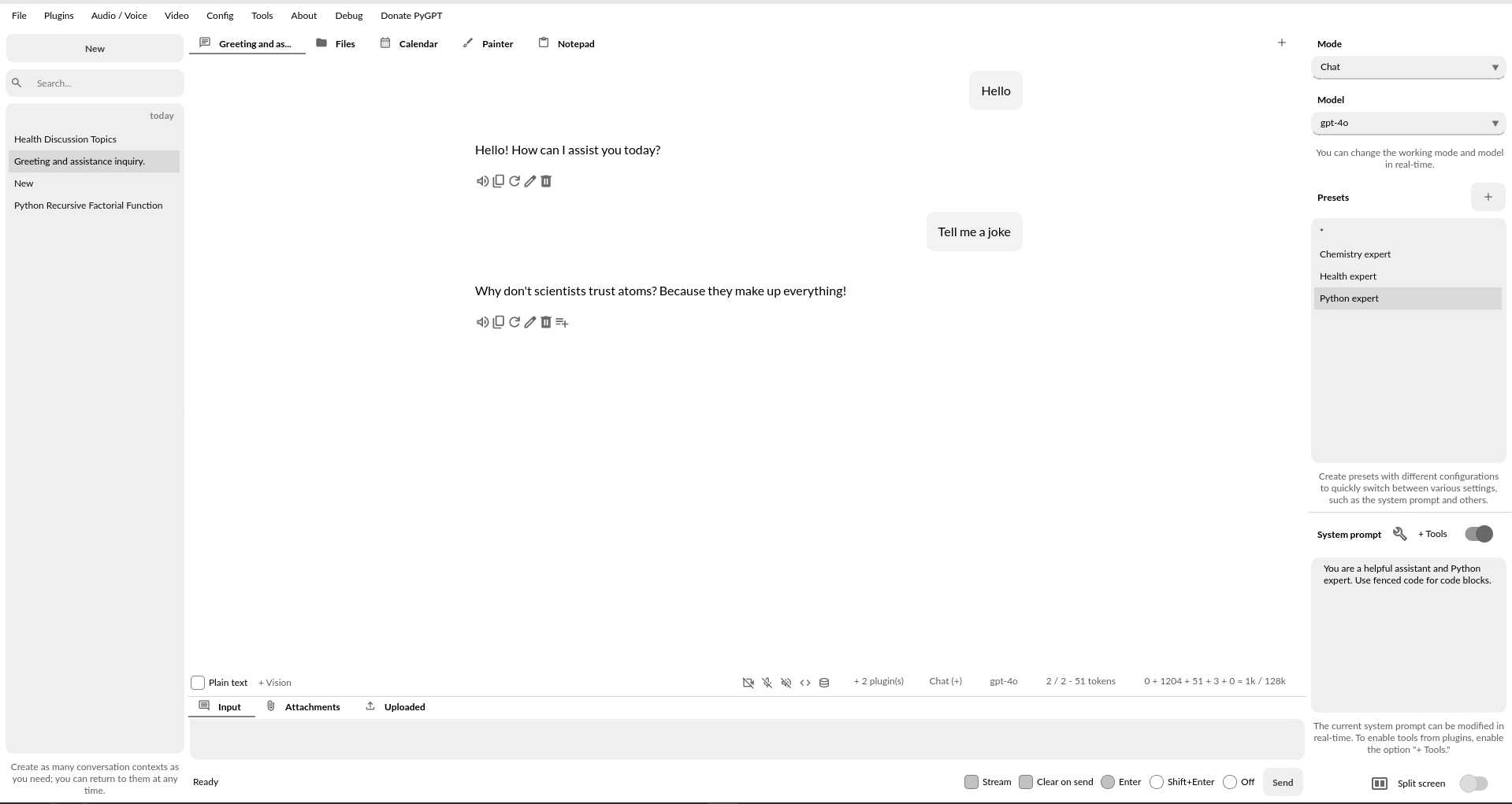
PyGPT is all-in-one Desktop AI Assistant that provides direct interaction with OpenAI language models, including GPT-5, GPT-4, o1, o3 and more, through the OpenAI API. By utilizing other SDKs and LlamaIndex, the application also supports alternative LLMs, like those available on HuggingFace, locally available models via Ollama (like gpt-oss, Llama 3, Mistral, DeepSeek V3/R1 or Bielik), and other models like Google Gemini, Anthropic Claude, Perplexity / Sonar, and xAI Grok.
This assistant offers multiple modes of operation such as chat, assistants, agents, completions, and image-related tasks like image generation and image analysis. PyGPT has filesystem capabilities for file I/O, can generate and run Python code, execute system commands, execute custom commands and manage file transfers. It also allows models to perform web searches with the DuckDuckGo, Google and Microsoft Bing.
For audio interactions, PyGPT includes speech synthesis using the Microsoft Azure, Google, Eleven Labs and OpenAI Text-To-Speech services. Additionally, it features speech recognition capabilities provided by OpenAI Whisper, Google and Bing enabling the application to understand spoken commands and transcribe audio inputs into text. It features context memory with save and load functionality, enabling users to resume interactions from predefined points in the conversation. Prompt creation and management are streamlined through an intuitive preset system.
PyGPT’s functionality extends through plugin support, allowing for custom enhancements (with multiple plugins included). Its multi-modal capabilities make it an adaptable tool for a range of AI-assisted operations, such as text-based interactions, system automation, daily assisting, vision applications, natural language processing, code generation and image creation.
Multiple operation modes are included, such as chat, text completion, assistant, agents, vision, Chat with Files (via LlamaIndex), commands execution, external API calls and image generation, making PyGPT a multi-tool for many AI-driven tasks.
Dark theme

Light theme
Features
Desktop AI Assistant for
Linux,WindowsandMac, written in Python.Works similarly to
ChatGPT, but locally (on a desktop computer).11 modes of operation: Chat, Chat with Files, Realtime + audio, Research (Perplexity), Completion, Image and Video generation, Assistants, Experts, Computer use, Agents and Autonomous Mode.
Supports multiple models like
OpenAI GPT-5,GPT-4,o1,o3,o4,Google Gemini,Anthropic Claude,xAI Grok,DeepSeek V3/R1,Perplexity / Sonar, and any model accessible throughLlamaIndexandOllamasuch asDeepSeek,gpt-oss,Llama 3,Mistral,Bielik, etc.Chat with your own Files: integrated
LlamaIndexsupport: chat with data such as:txt,pdf,csv,html,md,docx,json,epub,xlsx,xml, webpages,Google,GitHub, video/audio, images and other data types, or use conversation history as additional context provided to the model.Built-in vector databases support and automated files and data embedding.
Image generation via models like
DALL-E,gpt-image,Imagen,GeminiandNano Banana.Video generation via models like
Veo3andSora2.Internet access via
DuckDuckGo,GoogleandMicrosoft Bing.Speech synthesis via
Microsoft Azure,Google,Eleven LabsandOpenAIText-To-Speech services.Speech recognition via
OpenAI Whisper,GoogleandMicrosoft Speech Recognition.Plugins support with built-in plugins like
Files I/O,Code Interpreter,Web Search,Google,Facebook,X/Twitter,Slack,Telegram,GitHub,MCP, and many more.MCP support.
Real-time video camera capture in Vision mode.
Image analysis via vision models.
Included support features for individuals with disabilities: customizable keyboard shortcuts, voice control, and translation of on-screen actions into audio via speech synthesis.
Handles and stores the full context of conversations (short and long-term memory).
Integrated calendar, day notes and search in contexts by selected date.
Tools and commands execution (via plugins: access to the local filesystem, Python Code Interpreter, system commands execution, and more).
Custom commands creation and execution.
Crontab / Task scheduler included.
Built-in real-time Python Code Interpreter.
Manages files and attachments with options to upload, download, and organize.
Context history with the capability to revert to previous contexts (long-term memory).
Allows you to easily manage prompts with handy editable presets.
Provides an intuitive operation and interface.
Includes a notepad.
Includes simple painter / drawing tool.
Includes an node-based Agents Builder.
Supports multiple languages.
Requires no previous knowledge of using AI models.
Fully configurable.
Themes support.
Real-time code syntax highlighting.
Built-in token usage calculation.
Possesses the potential to support future OpenAI models.
Open source; source code is available on
GitHub.Utilizes the user’s own API key.
and many more.
The application is free, open-source, and runs on PCs with Linux, Windows 10, Windows 11 and Mac.
Full Python source code is available on GitHub.
PyGPT uses the user’s API key - to use the GPT models, you must have a registered OpenAI account and your own API key. Local models do not require any API keys.
Note
This application is not officially associated with OpenAI. The author shall not be held liable for any damages resulting from the use of this application. It is provided “as is,” without any form of warranty. Users are reminded to be mindful of token usage - always verify the number of tokens utilized by the model on the API website and engage with the application responsibly. Activating plugins, such as Web Search, may consume additional tokens that are not displayed in the main window. Always monitor your actual token usage on the OpenAI, Google, Anthropic, etc. websites.